Technical assurance
Azure Policy and a Terraform plan answer different questions
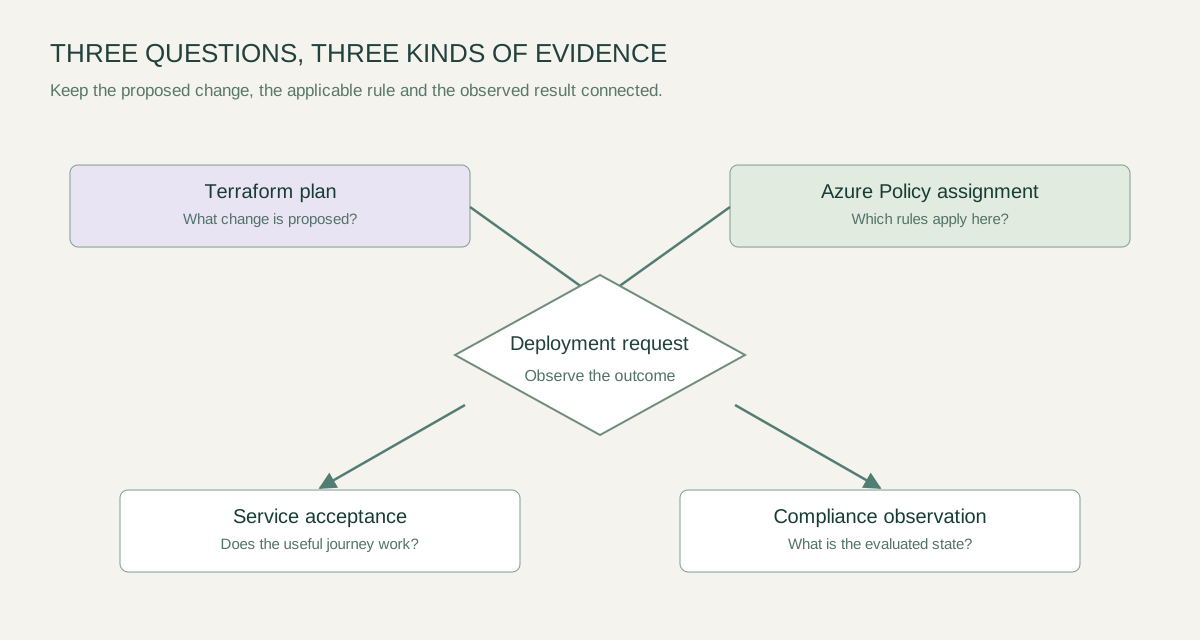
A proposed infrastructure change, an applicable governance rule and an observed service result are different kinds of evidence. Keep their meanings explicit when you build an Azure deployment pipeline.
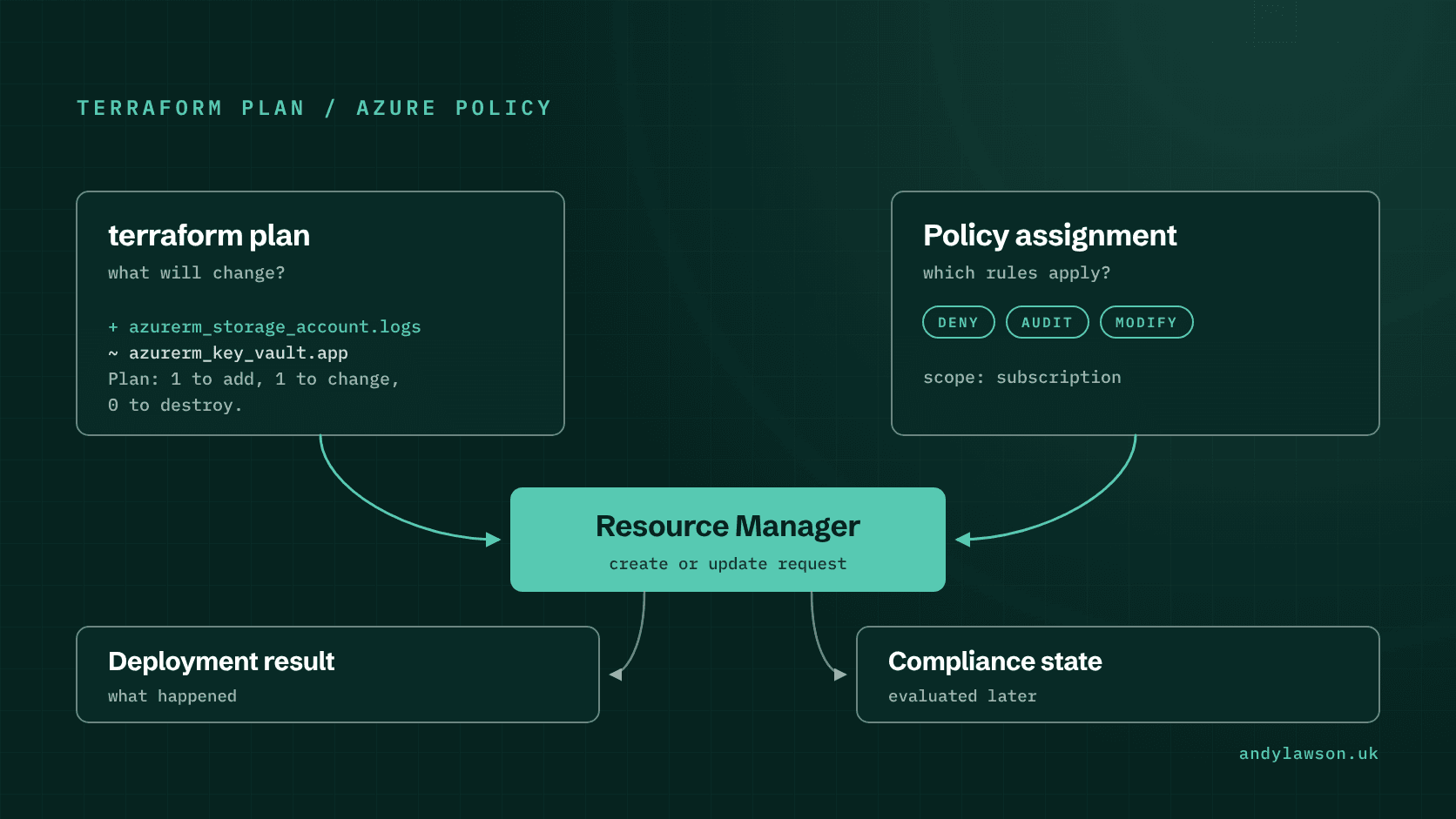
A Terraform plan can look reasonable and an Azure deployment can still be refused. An Azure Policy compliance view can also look reassuring while an application is unusable. These observations come from different layers of the platform.
I've watched a change pass plan review and then fail at apply on a deny policy nobody on the team knew was assigned. I've also seen a policy add tags outside Terraform, so every plan afterwards showed changes nobody had made.
I'd document what each check is meant to establish before combining them into a pipeline badge. The useful question is which evidence supports this change, at this scope, under these controls. A green result from one layer shouldn't silently become an answer about every other layer.
Take a lab in which a policy assignment on a resource group requires a particular tag. A small deployment is a practical way to examine the differences between configuration review, request enforcement and later compliance reporting.
Start with the change Terraform proposes
HashiCorp's plan documentation describes how 'terraform plan' builds an execution plan: it reads the current state of existing remote objects, compares the configuration with that state and proposes the actions that would make them match. It doesn't carry out those changes, so it never sends the create or update requests that Azure Policy evaluates. A policy deny shows up at apply, not at plan. Review the selected workspace or backend, input values, provider versions and target scope alongside that output.
Ask concrete questions. Which resources are created, modified or replaced? Is any resource unexpectedly absent? Does the plan describe the intended environment? A technically valid plan against the wrong state is still the wrong change.
Then record what remains outside that review. External service availability, the effective policy assignment and an application's user journey need their own evidence. A plan is one input to a deployment decision, not a certificate for the whole service.
For a controlled release, retain the reviewed configuration revision and the plan evidence under the organisation's handling rules. A saved plan file holds the full configuration and stores any sensitive values in cleartext, so treat its retention and access as part of the deployment design.
Inspect the assigned policy and its effect
Azure Policy evaluates resources against assigned definitions. Microsoft's overview describes the service's governance role, while the effect reference lists the available effects and the order in which they're evaluated.
For the lab, identify the exact assignment, its parameters, its scope and any exclusions or exemptions that apply. Don't infer the active rule from a policy definition's friendly name. An available definition isn't evidence that it is assigned to the target.
Test the missing-tag case under the chosen effect. An audit effect lets the request through, writes a warning event to the activity log and marks the resource non-compliant. A deny effect rejects an applicable create or update request with '403 (Forbidden)' before it reaches the resource provider. If a modify or append assignment also covers that tag, test it as well: those effects are evaluated before deny and audit, and can change the request so that neither triggers.
Use the documentation for the specific effect when designing remediation. A compliance scan doesn't rewrite non-compliant existing resources. Only 'modify' and 'deployIfNotExists' support remediation, and existing resources are brought into line by a remediation task that runs under the assignment's managed identity. Make that path, and the role the identity holds, explicit.
Keep preview tools tied to the deployment path
Azure Resource Manager what-if is a separate operation that predicts the changes an ARM template or Bicep file would make. Microsoft's what-if documentation describes its predictions, limitations and validation options.
Don't present an ARM what-if result as if it were Terraform's execution plan. Use the preview associated with the actual change path, and state which tool and options produced the evidence. Teams that use both tools need a clear account of which resources each owns.
A preview can also contain uncertainty. Terraform shows values it can't determine until apply as '(known after apply)', and what-if can't evaluate some expressions, such as 'reference()', and can report false changes that Microsoft calls noise. Read warnings and unresolved values instead of reducing the result to a count of modifications. Decide how an incomplete preview affects approval for the particular change.
For the lab, keep the prediction and the observed outcome together. If they differ, preserve the inputs and investigate the reason. That comparison is useful engineering evidence even when the final resource state happens to be acceptable.
Test a small matrix of outcomes
Use disposable resources and test one policy condition at a time. Keep the target subscription, resource group, identity and assignment constant while changing the input that the rule is meant to evaluate.
| Case | Evidence to retain |
|---|---|
| Required tag supplied | Plan, applicable policy and observed deployment result |
| Required tag absent under audit | Deployment result and the resulting compliance observation |
| Required tag absent under deny | The refused request and the matching policy details |
| Resource outside the assignment's effective scope | Evidence that the test is outside that rule's coverage |
The last case matters. A successful deployment outside the assignment's scope doesn't show that the policy is ineffective, only that the scope differs. Explain that difference in the test result.
Allow for the documented evaluation timing when checking later compliance. Microsoft says the result for a created or updated resource reaches the portal and SDKs around 15 minutes later, a new assignment takes about five minutes to apply before evaluation starts, and the standard cycle re-evaluates assignments every 24 hours. A request-time refusal and a later compliance view are different observations, so record when each was made and don't imply that every view updates at the same time.
Make exceptions reviewable
A deployment blocked by policy should prompt a decision about the intended control. Investigate the applicable rule, the requested change and the reason the combination is being refused before changing either side.
If an exception is justified, give it a named owner, a bounded scope and a review point. For a time-bound or specific case, Microsoft recommends an exemption over an exclusion: it's a separate Resource Manager object, it shows as 'Exempted' in compliance reports, and it can carry a category ('Waiver' or 'Mitigated'), an expiry date and metadata. Keep its reason beside the change record so that the next engineer can distinguish deliberate accommodation from an unexplained gap.
Equally, don't treat a successful deployment as the end of validation. Run the service's acceptance journey and inspect the resulting configuration. A resource may satisfy a governance rule and still have an incorrect dependency, identity or application setting.
The platform becomes easier to operate when its checks have specific meanings. Terraform explains a proposed infrastructure change. Azure Policy applies the configured governance rules. Deployment observations and service tests show what actually happened. A release decision is stronger when those answers are connected without being collapsed into a single ambiguous green badge.