Technical assurance
Prove an Azure deployment identity fails outside its boundary
A successful Azure deployment only proves the permitted case. A small disposable lab can show where an excluded branch, an untrusted job context and an unrelated resource target are each refused.
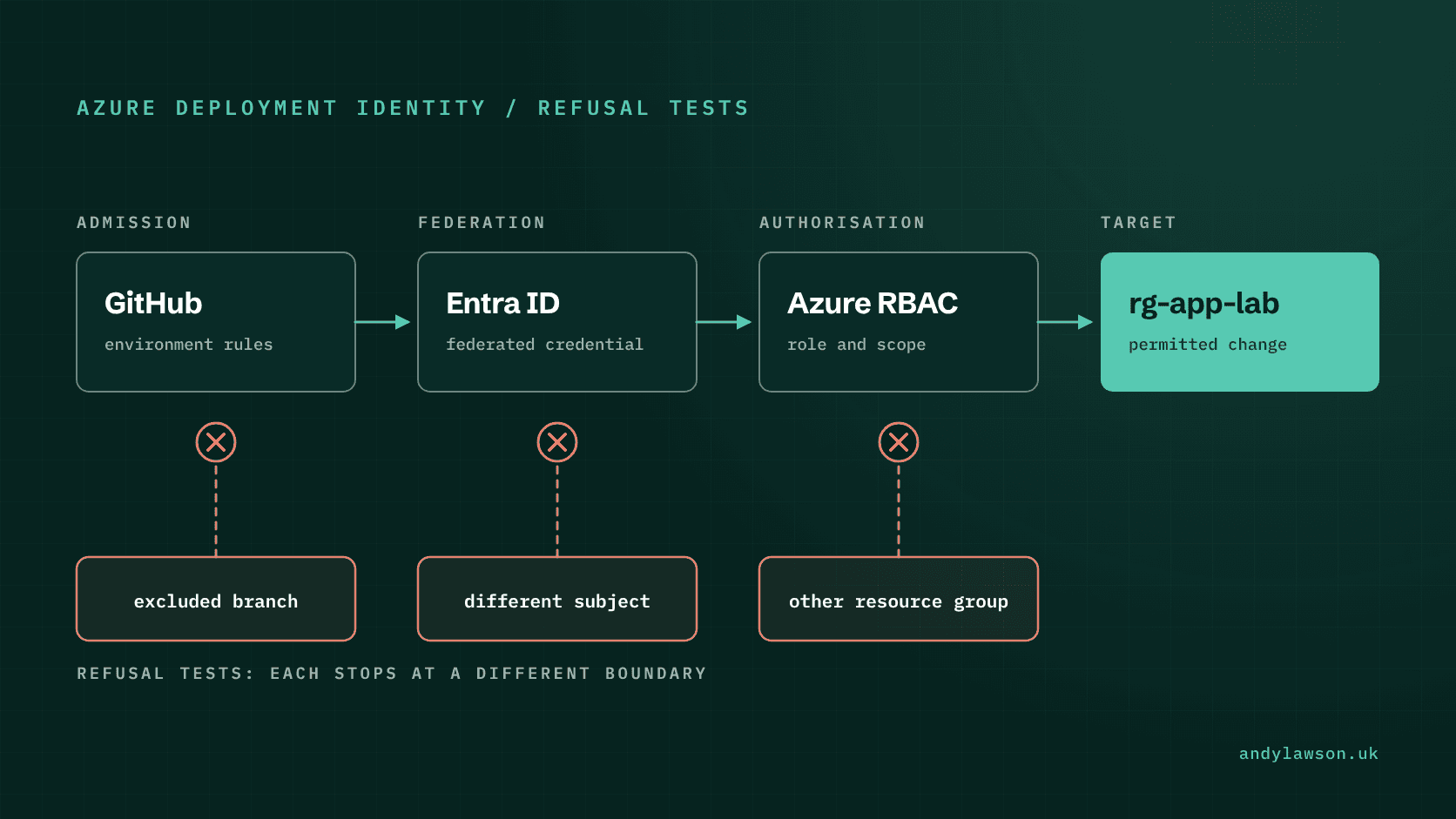
Removing a stored secret from an Azure deployment pipeline is a useful improvement. The next question is whether the resulting identity refuses work outside its intended boundary. A successful deployment answers only the permitted case.
I've reviewed pipelines where the federated credential was tightly scoped, but the identity behind it had Contributor on the whole subscription because that was what made the first deployment work. I've also seen a 'temporary' Owner assignment, granted to unblock a pipeline, still in place a year later.
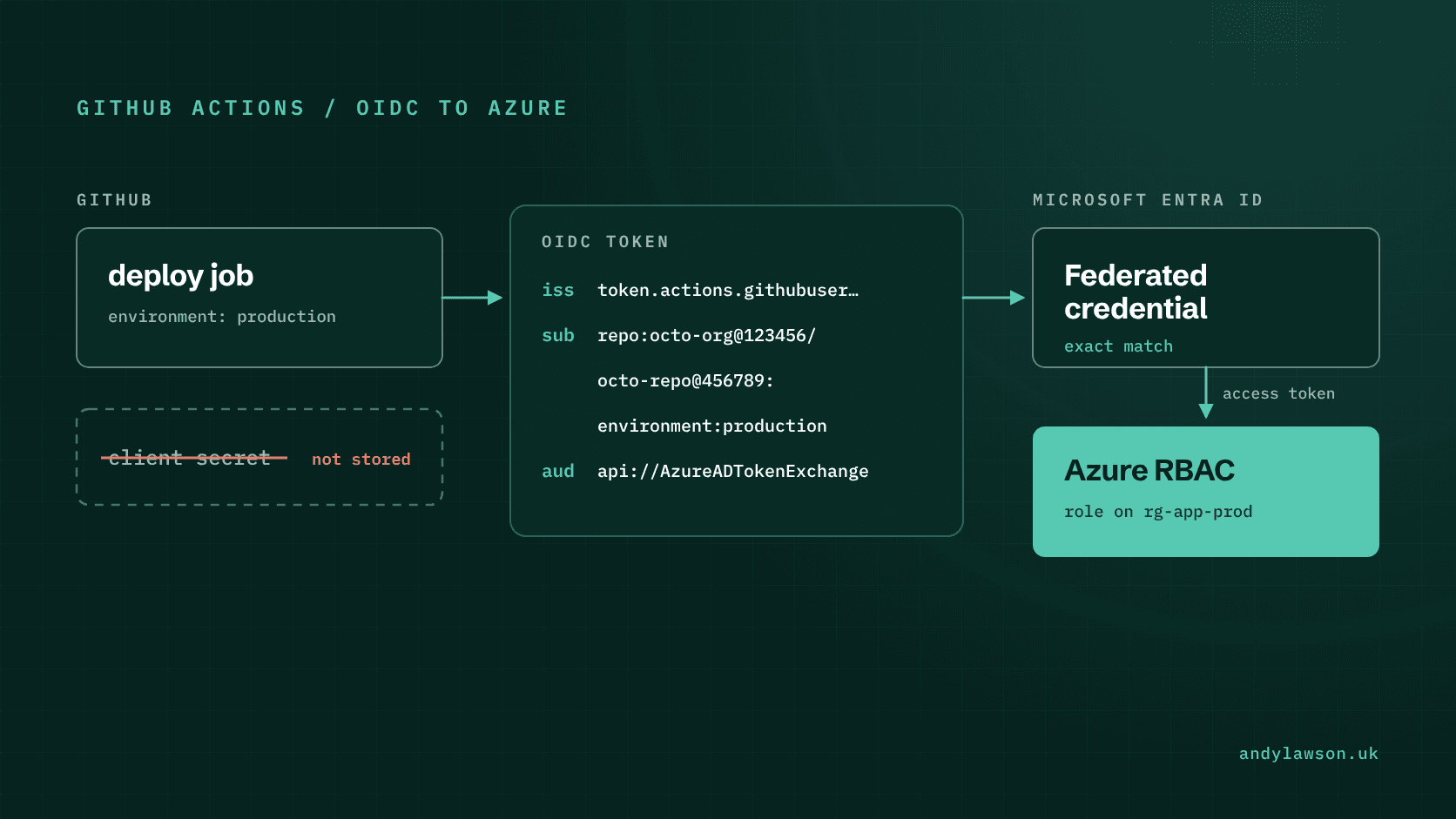
My October piece on GitHub Actions and Azure federation separated the workflow, the trust relationship and the Azure role assignment. This follow-up turns that separation into a small acceptance exercise.
The aim is clear evidence of which control made each decision. Use disposable resources and keep sanitised results so that each observation can be attributed to the boundary under test.
Write down the permitted case first
Define one deployment context and one bounded operation. For example, an approved job in a lab repository may update a disposable resource in a dedicated Azure resource group. Record the expected GitHub context, Azure principal, role assignment and target scope before running it.
Use a resource whose behaviour and cost you understand. A successful test needs to show that the intended operation happened, not just that an Azure login command returned without an error.
GitHub's Azure OIDC setup guidance distinguishes permission to request an OIDC token from permission to modify cloud resources: 'id-token: write' lets the job request a token, but it doesn't grant access to any resource. Keep those two observations separate in the acceptance record.
Capture the repository and workflow revision, the job context and the resource identifier. Record non-sensitive evidence about the effective identity, such as the principal's object ID and the token's 'sub' claim. Don't keep a raw bearer token as convenient proof of authentication.
Change one trust condition at a time
Microsoft's federated credential guidance requires the issuer, subject and audience to match the incoming token exactly, including case. Wildcards aren't supported, except in flexible federated identity credentials, which are in preview and, for GitHub, must also check the repository ID or owner ID. Check the claims your repository actually issues; don't assume every repository uses the same subject format. GitHub applies an immutable format to repositories created, renamed or transferred after 15 July 2026, 'repo:OWNER@OWNER-ID/REPO@REPO-ID:...', while older repositories keep the name-based format unless they opt in.
First run the permitted case. Then use a separately controlled job context that should not match the configured trust. Keep the Azure operation unchanged. If the token exchange is refused, the failure belongs to the authentication boundary, not the target resource's permission check. Microsoft's pages differ on what you'll see: the trust guidance says a mismatched subject fails 'without error', while its authentication changes log documents AADSTS700213, 'No matching federated identity record found', for the same mismatch. Record whatever your login step reports.
An environment context needs its own care. The GitHub OIDC reference explains how job context changes the subject: when a job references an environment, the subject carries the environment name and no branch, so a credential that trusts the environment doesn't restrict branches on its own. A familiar environment name isn't an acceptance test for branch restrictions or human approval either, because GitHub creates a missing environment, with no protection rules, the first time a workflow references it.
Check your GitHub plan first. On GitHub Free, Pro and Team, required reviewers only apply to public repositories, so a private repository needs GitHub Enterprise for them; deployment branch rules are also available for private repositories on Pro and Team. Then attempt the same deployment, still referencing the environment, from a branch that should be excluded, and record whether the job is blocked before it receives deployment authority. Administrators can bypass environment protection rules by default, so record whether 'Allow administrators to bypass configured protection rules' is still selected.
Test Azure authorisation with a valid identity
The next case should authenticate successfully and then request an operation outside the intended resource boundary. This distinguishes a valid identity from an appropriately limited one.
Use a second disposable resource group that the deployment principal isn't meant to manage. Before calling the operation, list the principal's role assignments, including those inherited from parent scopes ('az role assignment list' with '--all' and '--include-inherited' does this), and check any groups it belongs to. An assignment at subscription or management-group scope may cover both groups even if the resource-group assignments look different.
Microsoft's RBAC scope documentation explains that inheritance. The expected refusal only means something when the effective permissions really exclude the second target.
Choose a test operation that's safe if it unexpectedly succeeds. A harmless update to a disposable test resource is a better probe than deleting a shared resource to show that deletion is forbidden.
If the operation succeeds unexpectedly, stop and investigate the authority that permitted it. Narrowing the role until one test turns red isn't enough; establish which assignment or credential path explains the result. Role assignment changes can take up to 10 minutes to take effect, so allow for that before treating a refusal or a success as final.
Keep the failure locations distinct
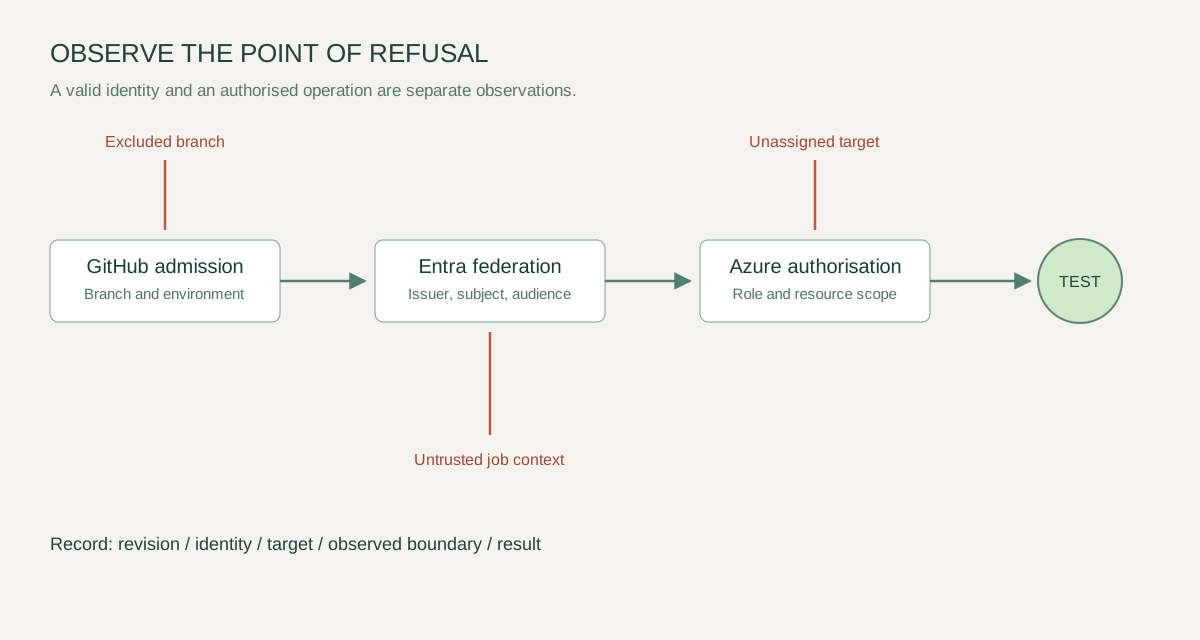
A single 'access denied' badge hides important differences. The job might never have passed a GitHub rule, the external token might not have matched the federation configuration, or Azure might have refused the resource operation after authentication succeeded.
| Exercise | Expected result |
|---|---|
| Permitted context and permitted disposable target | Authentication and the intended change succeed |
| Untrusted job context | Federation refuses the exchange |
| Branch excluded by a configured environment rule | GitHub prevents the protected deployment |
| Trusted identity and an unrelated, unassigned target | Azure authorisation refuses the operation ('AuthorizationFailed') |
Store the outcome with enough context to distinguish those cases. Keep timestamps, workflow revision, principal identifier, target and the relevant error code. Redact credentials and any unrelated resource details.
A refusal caused by a typo or an unavailable service doesn't prove the intended control works. Pair each negative case with a working permitted case, and explain why the observed failure belongs to the boundary under test.
Turn the exercise into a maintainable check
Acceptance evidence goes stale. Repository transfers, environment changes, runner changes and permission changes can alter the route through which a job obtains authority. A repository renamed or transferred after 15 July 2026 also moves to GitHub's immutable subject format, which a name-based federated credential won't match. Decide which changes require the lab to be rerun.
Keep deployment authority out of ordinary validation jobs. Reading configuration, checking formatting and reporting a plan shouldn't inherit the identity used for an apply. Review any script that runs after login, because it can use the authority already obtained.
Record deliberate exceptions with an owner and a review point. A bootstrap identity may legitimately need wider access than an application deployment, but combining the two without explanation makes future refusals harder to interpret.
Finally, remove the disposable resources and temporary assignments when the exercise is complete. Keep the runbook and the sanitised results. What lasts is a repeatable way to show that the right job gets the intended authority and that specific wrong jobs and targets are refused for reasons you understand.