Technical assurance
GitHub Actions to Azure without stored credentials
Workload identity federation removes a stored Azure credential from a deployment pipeline. The engineering task is deciding which workflow may obtain access, what it may change and how that boundary is tested.
A deployment pipeline can stop storing an Azure client secret and still retain far more authority than it needs. The authentication mechanism improves, but the consequences of running the wrong workflow may remain unchanged.
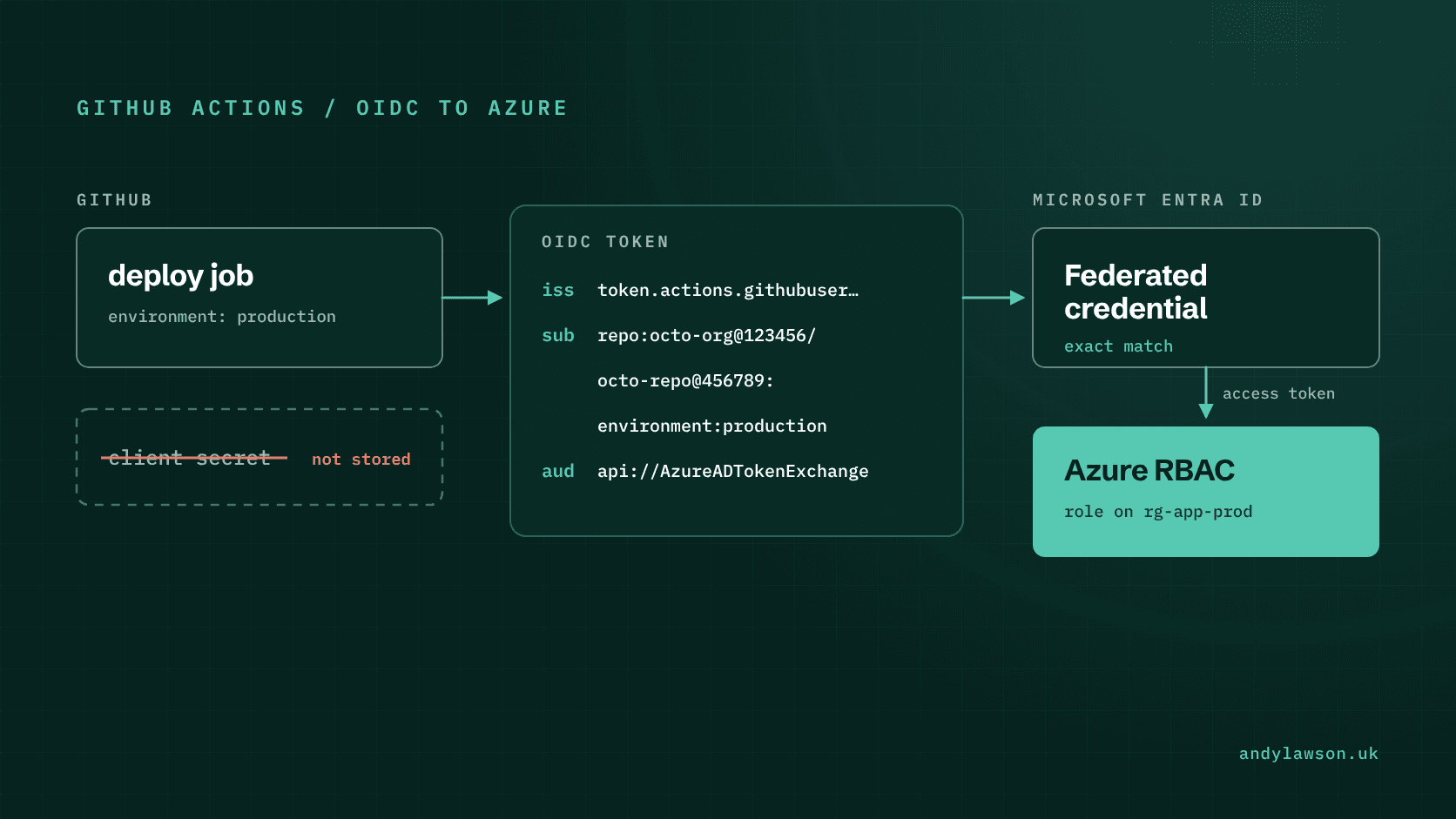
GitHub Actions can use OpenID Connect, or OIDC, to authenticate to Azure through Microsoft Entra workload identity federation. The workflow exchanges a GitHub-issued token for Azure access instead of retrieving a long-lived Azure credential. GitHub documents the setup, including the permission needed to request an OIDC token.
I'd treat that change as an opportunity to define the deployment boundary properly. Three questions need separate answers: which job is trusted, what its Azure identity can do, and which changes people are permitted to send through that job.
Separate authentication from deployment authority
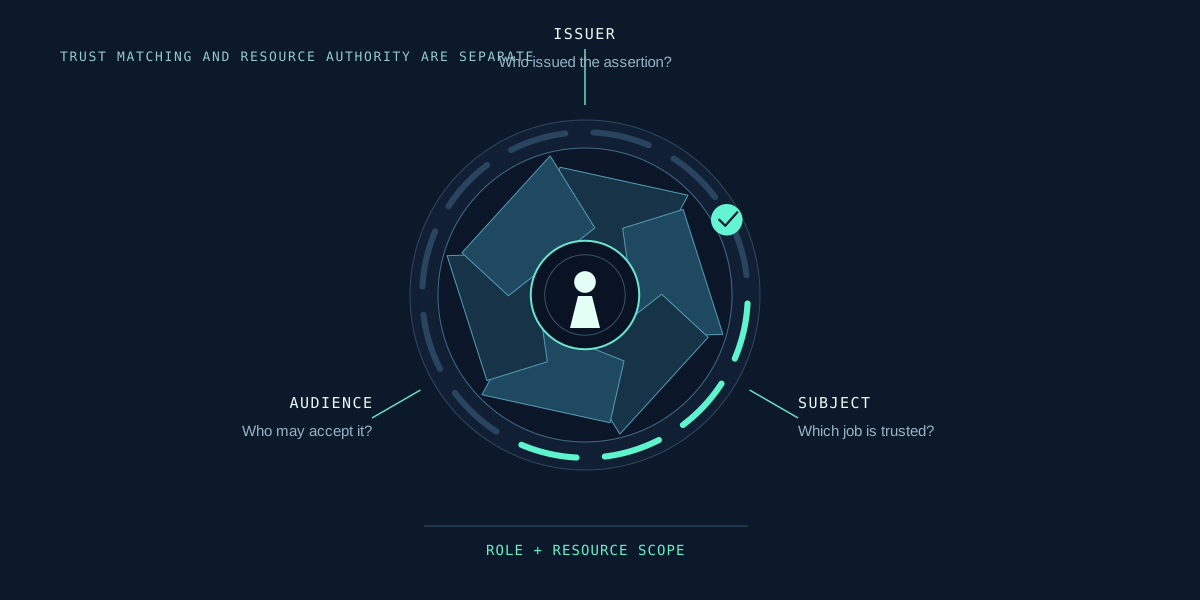
Federation establishes that an external workload meets the configured trust conditions. Azure role assignments establish its authority over Azure resources. A successful login doesn't demonstrate that those assignments are appropriate.
Microsoft Entra checks the external token's issuer, subject and audience against the federated credential, and each has to match exactly. The trust configuration guidance explains those fields. Wildcards aren't supported, and a wrong subject saves without complaint: you only find out when the token exchange fails. Flexible federated identity credentials, still in preview, do allow wildcard matching, but for GitHub the expression must also check the repository or owner ID. Don't copy a subject string from someone else's example and assume it matches your workflow.
Write down the intended relationship in plain language before configuring it: this deployment job, from this repository and deployment context, may use this identity to manage this resource boundary. If that sentence is difficult to complete, the identity design is probably carrying several responsibilities that need separating.
In a small lab, I'd give the deployment identity access to a dedicated resource group. The purpose is to make an unexpected permission easy to detect and an accidental change easy to contain. Production scope should follow the resources and operations actually required, including dependencies that sit elsewhere.
Check the subject your repository actually issues
The subject identifies the workload context that Azure is being asked to trust. GitHub's OIDC reference distinguishes jobs using an environment from jobs whose default subject identifies a branch or pull request. An environment subject doesn't itself prove that only an approved branch can reach that environment.
The reference also covers immutable subject claims. On github.com, repositories created after 15 July 2026 include the owner and repository IDs in the default subject, for example 'repo:octo-org@123456/octo-repo@456789:ref:refs/heads/main'. Older repositories keep the name-only format unless they're opted in at organisation or repository level, but renaming or transferring a repository after that date moves it to the new one. A custom subject template can change the rest of the subject, but it can't remove those IDs. A new lab and an older repository can therefore need different subject values even when their workflow files look similar.
Inspect the relevant configuration and compare the expected claims without publishing a raw token in build logs or screenshots. Record the matching rule as part of the deployment documentation. That makes a future rename or environment change an identifiable dependency rather than an unexplained authentication failure.
Make the GitHub environment part of the control
An environment name is useful only when its access rules match the deployment intention. GitHub environments support deployment protection rules, such as branch restrictions, required reviewers and wait timers. What you get depends on your plan. Public repositories get them on every current plan, but for private repositories branch restrictions need Pro, Team or Enterprise, and required reviewers need Enterprise.
Check those controls explicitly. Who can change the workflow? Who can change the environment? Can the person requesting a deployment also approve it? Which branches or tags are allowed? What happens when an administrator bypasses a rule? Administrators can bypass protection rules by default, so untick 'Allow administrators to bypass configured protection rules' if that isn't what you want.
Keep ordinary validation outside the job that has deployment authority. A pull request should be able to lint configuration and report useful findings without automatically becoming a route to production access. Review any step that executes repository scripts after cloud login: the script's contents are part of the authority being granted.
This is also a reason to keep the privileged job small. Every additional tool and dependency makes the trust decision harder to explain.
Scope Azure permissions to the work
An Azure role assignment combines a security principal, a role definition and a scope. Permissions assigned at a parent scope flow to its children, as Microsoft's scope guidance explains. A resource-group assignment and a subscription assignment therefore have materially different reach.
Separate the identity that establishes shared prerequisites from identities used for routine delivery when their responsibilities differ. A workload that updates an application shouldn't inherit the bootstrap process's authority simply because both happen to use Terraform.
List the operations needed by the deployment and examine failures against that list. Broadening a role until the pipeline turns green can hide a missing design decision. Sometimes broader scope is justified; record why, who owns it and what would allow it to be reduced later.
Remember that a successful Azure login says nothing about another provider's credentials. Assess each external system separately before calling the whole pipeline credential-free.
Test refusals as deliberately as success
A useful lab should prove more than one successful deployment. Keep the tests small and give each a specific expected result.
| Test | Expected result |
|---|---|
| Intended job in the permitted context | Authentication and the authorised operation succeed |
| Job with a different subject | Token exchange is refused |
| Permitted identity targeting an unrelated resource group | Azure refuses the operation, provided no subscription or management group assignment covers that group |
| Branch outside the environment rules | The deployment job cannot pass the environment control |
| Ordinary pull-request validation | Checks complete without deployment access |
These tests show whether a failure happens at GitHub, at the federation step or at Azure authorisation. That makes the result more useful than a single statement that the pipeline is secure. Keep the test identities, resources and logs synthetic, and remove the lab role assignments when the exercise ends.
It's the same principle as in my piece on testing Entra access paths: you only have assurance once you've watched the right decision being made along a known route. Removing the stored secret is a worthwhile change. The harder part, and the part worth keeping up to date, is knowing exactly which job can obtain which authority.