Technical assurance
Microsoft 365 Copilot governance begins with retrieval boundaries
Copilot can make existing information easier to retrieve. Governance needs to establish whether that information is appropriately accessible, trustworthy and owned.
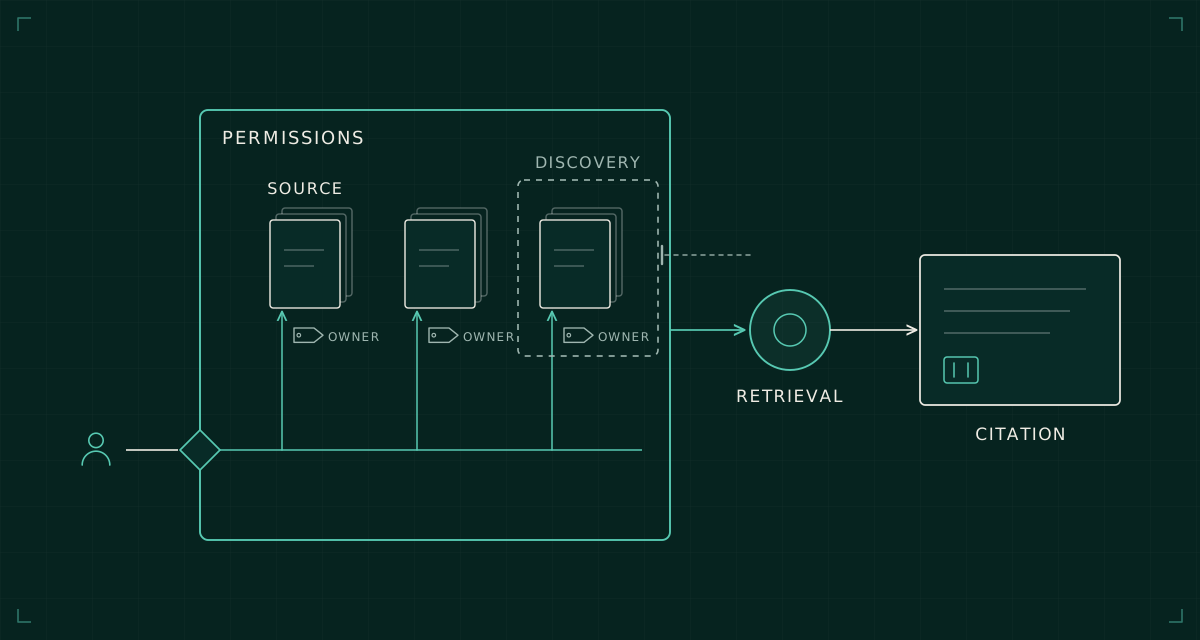
An organisation can have a technically valid permission model and an uncomfortable information-governance problem at the same time. A document may be accessible because somebody granted a broad group access years ago, even though its owner would not choose that audience today.
Microsoft 365 Copilot brings that distinction into focus. It can reduce the effort involved in finding and combining information. The question is therefore not limited to whether the product respects permissions. It is whether those permissions and the content behind them still represent the organisation's intentions.
I would treat deployment as an information and access design exercise with a defined set of retrieval journeys. Licences and training are necessary, but they cannot establish the suitability of the information estate.
Understand what permission-aware retrieval proves
Microsoft's data, privacy and security documentation explains that Copilot surfaces organisational information the user is authorised to access through the underlying controls. That is a useful security boundary. It does not certify that the permission assignment itself is appropriate.
Consider a hypothetical acquisition folder shared with a broad internal group. A user might have been able to reach it through SharePoint before Copilot was introduced, but rarely knew it existed. More convenient retrieval can expose the consequences of that old sharing decision without creating a new permission grant.
The response should be to investigate the access and ownership, rather than treat the discovery of a document as proof that Copilot bypassed security. Equally, saying that the permissions were technically respected is not enough to close the governance issue.
Record both questions: was access enforced correctly, and was that access intended? They require different evidence and may have different owners.
Scope a useful pilot around information journeys
Choose a bounded user population and a small set of business tasks. For each task, identify the likely source locations, their owners, the intended audience and the outcome the user should obtain.
A policy-finding task might draw on an approved procedure library. A project-summary task might span a team site, meeting material and email. The second journey has a different ownership and quality problem from the first, even if both use the same product.
Test with identities that have different rights. Include a user who should retrieve the source, one who should not, and an external identity if that forms part of the actual workflow. Keep prompts and observations in a controlled record, with sensitive material handled under the organisation's rules.
Use representative content, not only a carefully curated demonstration site. A pilot that avoids the ambiguous parts of the estate may validate user enthusiasm while leaving the deployment's real risk unexamined.
Distinguish access controls from discovery controls
SharePoint Restricted Content Discovery can reduce organisation-wide discovery of selected sites. Microsoft's documentation explains that it does not change site permissions or remove content from the search index; permitted users may still access it and discover content through supported contexts.
That makes it a useful deployment control for particular scenarios, subject to current prerequisites and propagation behaviour. It should not be described as a permission boundary or used to imply that oversharing has been remediated.
The design record should explain the control's purpose: temporarily limit discovery while ownership is reviewed, or maintain a deliberate discovery policy for a particular information area. Give the setting an owner and a review date.
Then address the underlying access decision. Review group membership, sharing links and inherited permissions with the content owner. Apply sensitivity and information-protection controls according to the actual classification and service behaviour. A label is meaningful only when its configuration and handling match the intended protection.
Govern the quality of what gets found
A correctly authorised answer can still be operationally wrong. An old procedure, an abandoned project plan or a draft presented alongside an approved document can give a user misleading context.
Establish how authoritative content is identified. Ownership, approval status, review dates and replacement relationships should be visible to people as well as systems. Where several documents disagree, the governance task is to resolve that disagreement, not simply ask for a more confident summary.
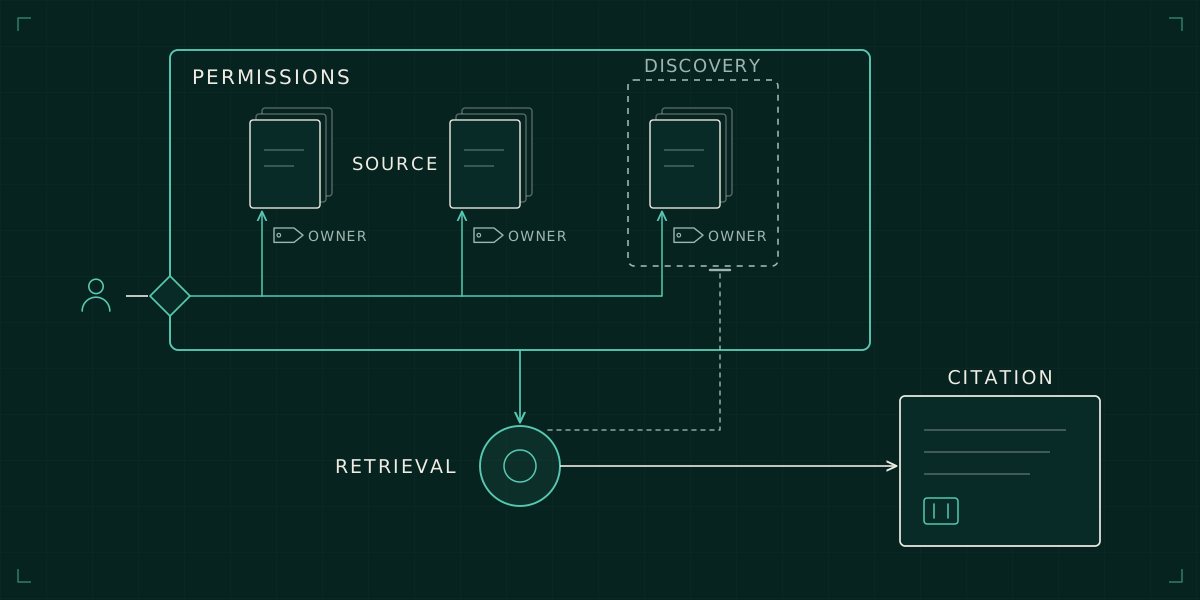
Train users to inspect citations for consequential work. The presence of a source link helps verification; it does not establish that the source is current or authoritative. The user needs to recognise when the answer supports drafting and when a business decision requires additional review.
This is one reason relationship-led discovery matters. A collection of files becomes useful evidence only when ownership, access, purpose and limits are understood together.
Treat extensions as new data paths
Connectors and agents can introduce information and actions beyond the original Microsoft 365 sources. Microsoft's privacy documentation describes permission-aware access for connector content and administrative control of available agents. Each extension still deserves its own assessment.
Record its source system, authentication model, permission mapping, data destination and operating owner. If the extension can take actions, identify the authority under which those actions occur and how they are audited. A successful retrieval test does not establish safe action permissions.
Review changes to an extension as changes to the information boundary. A new connector scope, different credential or altered external endpoint can change the deployment's risk without any visible change to the Copilot interface.
Avoid treating all products carrying the Copilot name as one security configuration. Document the actual experience, licence, enabled capabilities and data paths under review. That keeps the assurance statement tied to the deployed service.
Keep governance active after rollout
Permissions, group membership and content quality continue to change. The operating model needs recurring ownership review, an incident route for inappropriate retrieval and a process for adding new sources or extensions.
Define success in terms of useful tasks completed with acceptable information boundaries. Adoption figures help understand use, but they do not measure whether sensitive sources are appropriately restricted or whether answers rely on current material.
The practical goal is a service in which the organisation understands what users can retrieve, why they can retrieve it and how to correct a mistake. Copilot governance improves when those answers become part of normal information management rather than a one-off exercise attached to licence deployment.