Cloud and EUC
Azure Compute Gallery images need a release process
A Windows image appearing in Azure Compute Gallery proves that a build produced an artefact. Releasing that image requires decisions about validation, regional availability, deployment selection and recovery.
A new Windows image finishes building and appears in Azure Compute Gallery. The pipeline is green. That's a useful result, but it leaves an operational question unanswered: should any desktop service start using it?
The build has produced something that can be deployed. Release is a separate decision about a particular version, an intended workload and the evidence supporting its use. Treat them as one decision and every successful build becomes a deployment by default.
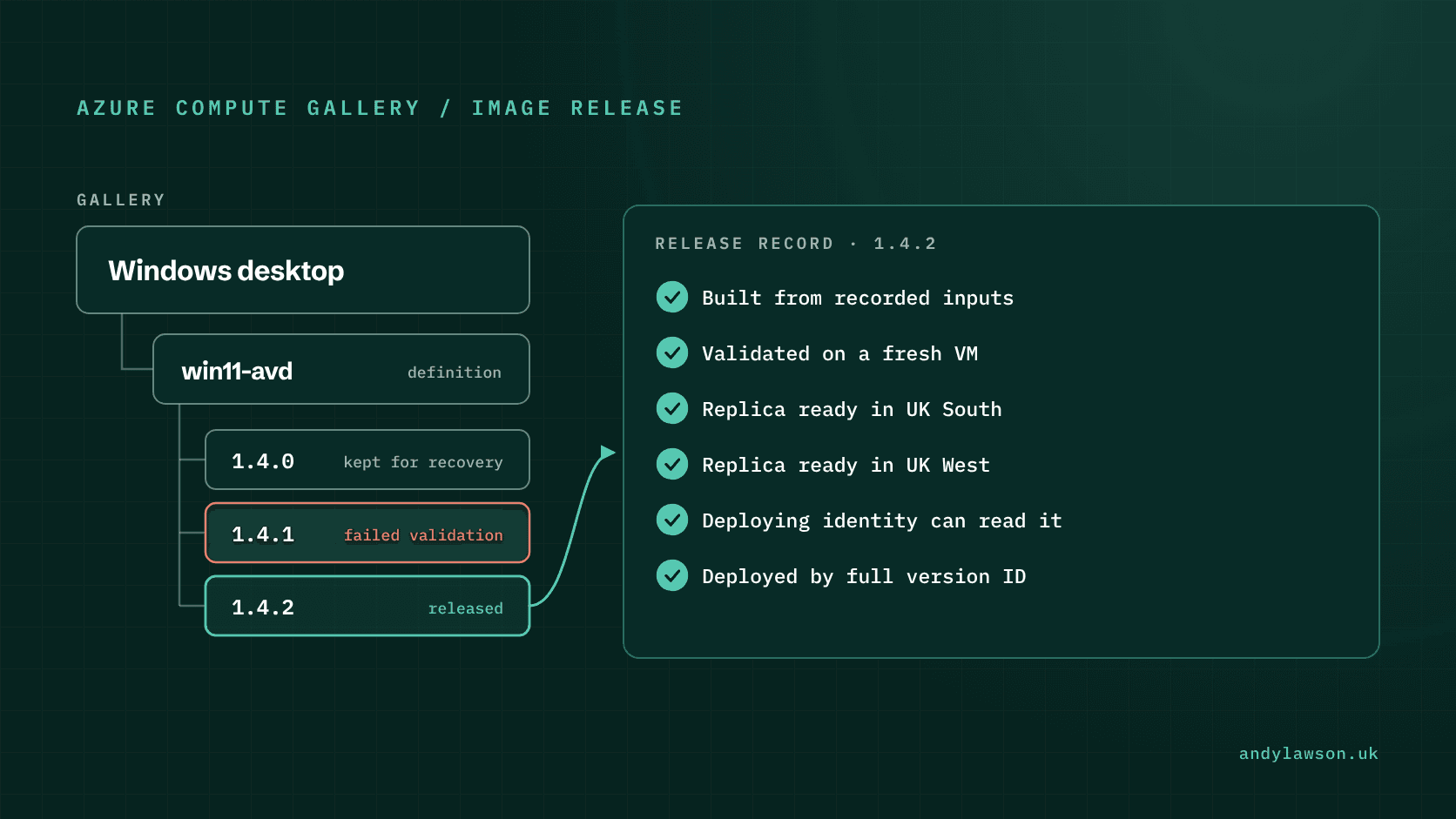
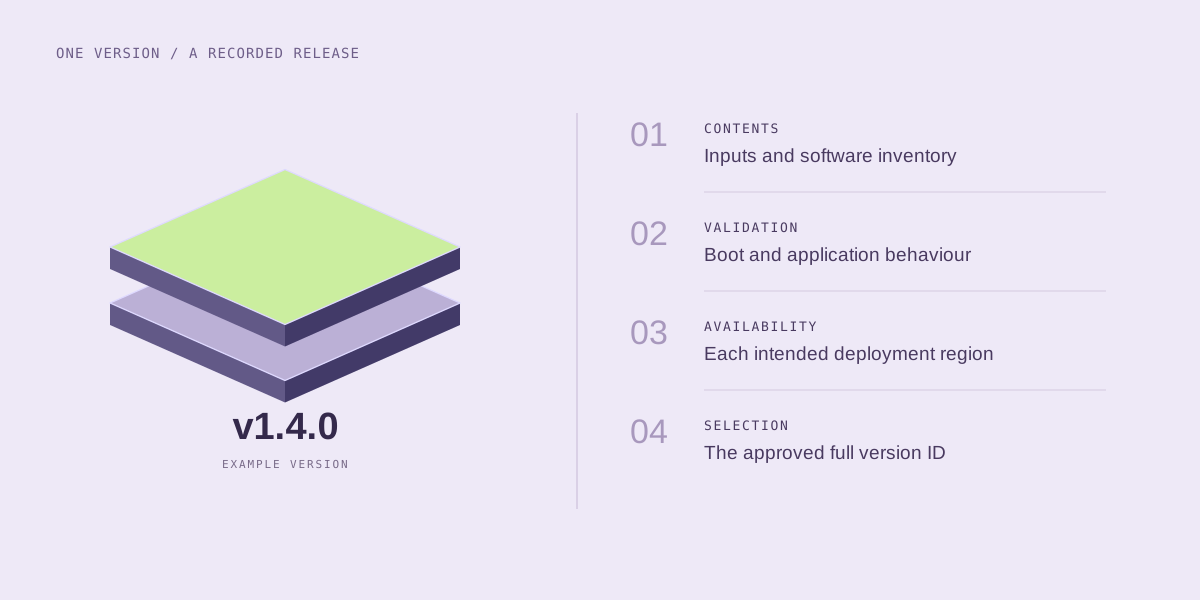
For Azure desktop platforms, I'd make the image version the centre of a small release record. It should connect the inputs, checks, target regions and approval to the exact artefact that a deployment will use.
Give the image version a clear identity
Azure Compute Gallery distinguishes a gallery, an image definition and an image version. The definition describes an image type and its compatibility properties. A version is the resource used to create virtual machines.
Keep that distinction visible in the release process. A statement that the Windows desktop image is approved is incomplete if several versions exist beneath the same definition. Record the full version resource ID rather than only a friendly name or the pipeline run that created it.
Version numbers use a three-part MajorVersion.MinorVersion.Patch format, such as 1.4.2, and each part has to fit in a 32-bit integer. The number identifies the version; it doesn't tell you what changed. Attach a concise change description: operating-system updates, application changes, configuration changes and known exceptions. Someone investigating a failed sign-in should be able to find those differences without reconstructing the build history.
Treat a released version as fixed. If the contents need to change, build a new version and give it a new record. Reusing an informal release label for different contents makes comparison and recovery much harder.
Preserve the inputs that explain the build
The gallery resource alone won't explain every decision made while constructing the operating system. Keep a manifest beside the release record containing the source image reference, configuration commit, build-tool versions and installed software inventory.
Where a build downloads packages, record the selected versions and integrity checks used. An unchanged repository can still produce a different machine if an installer URL now returns newer contents. Where inputs can't be fixed, record that limitation and test the resulting output rather than describing the build as fully reproducible.
Distinguish the planned application list from the observed inventory. An installation task reporting success and an application being present in the captured image are separate observations. Both can help explain a fault, but only the latter describes what the deployed machine actually contains.
Keep this manifest free of credentials, temporary passwords and access tokens. A release record often needs a longer life and a wider readership than the build machine that produced it.
Validate a machine created from the captured version
Testing only the machine used to build the image leaves an important gap. Generalisation, capture and first boot can change behaviour. Create a validation VM from the exact gallery version and test the journeys the image is supposed to support.
For a typical desktop image, I'd check first boot, required services, application launch, whether configuration has applied, and restart behaviour. A desktop-platform test would add its own registration and user-session checks. Decide the expected results before starting the build so that validation doesn't become a search for reassuring output.
Separate blocking failures from accepted exceptions. A missing application and a documented cosmetic defect shouldn't become interchangeable warnings. Every exception needs an owner and a reason the release can proceed despite it.
Keep the validation VM disposable. Preserve its relevant evidence, then remove the test resources through the agreed lab clean-up process. The release record should survive without requiring that particular machine to remain running.
Check readiness in every deployment region
Creating an image version and making it usable in all intended regions are different milestones. Microsoft's image-version creation guidance describes regional replication and notes that replication can take time.
Make each target region an explicit readiness check before rollout. Record the version being checked, the intended region and the result. A successful deployment in one region shouldn't be used as evidence that a later rollout elsewhere will succeed.
Include access as well as availability in that check. The identity that deploys the image might not be the one that built it. Deploying needs read access to the image version, and across subscriptions or tenants that access has to be granted explicitly. Check it; don't assume it works because the build job could reach the image.
If a region isn't ready, pause that rollout and retain a clear status. Automatically substituting a different version changes the release decision. That may be an acceptable recovery action, but it needs its own explicit rule.
Select approved versions explicitly
Azure can pick the 'latest' gallery version for you. That means the highest version number with a replica in the target region, not the newest one you created. The creation guidance explains the 'Exclude from latest' setting, which stops a version being picked that way. It only changes what 'latest' resolves to: anyone with access can still deploy that version by its number, so it isn't an approval or access-control mechanism.
For controlled rollouts, I'd resolve the approved release to a complete version ID and record that ID in the deployment input. Keep the tested candidate and the promoted release tied to the same artefact. Rebuilding separately for each environment introduces another variable that the earlier validation didn't cover.
Retention also needs an explicit rule. Keep the previous usable version, its release evidence and the information needed to deploy it until the recovery window closes. An end-of-life date is informational in Azure Compute Gallery; Microsoft states that it doesn't prevent VM creation.
Record the deployment result against the release
The release record should eventually show where the version was used and whether acceptance succeeded. That closes the loop between a build artefact and the service people actually receive.
This builds on my earlier piece on designing the whole desktop service, written for Windows 11 on AWS WorkSpaces. The same thinking applies on Azure. A well-built operating system is necessary, but its value depends on controlled delivery into a working service. An image release is ready when the next engineer can identify it, explain its contents, deploy the approved version and follow a credible recovery path.