Cloud and EUC
Windows 11 on AWS WorkSpaces: design the whole desktop service
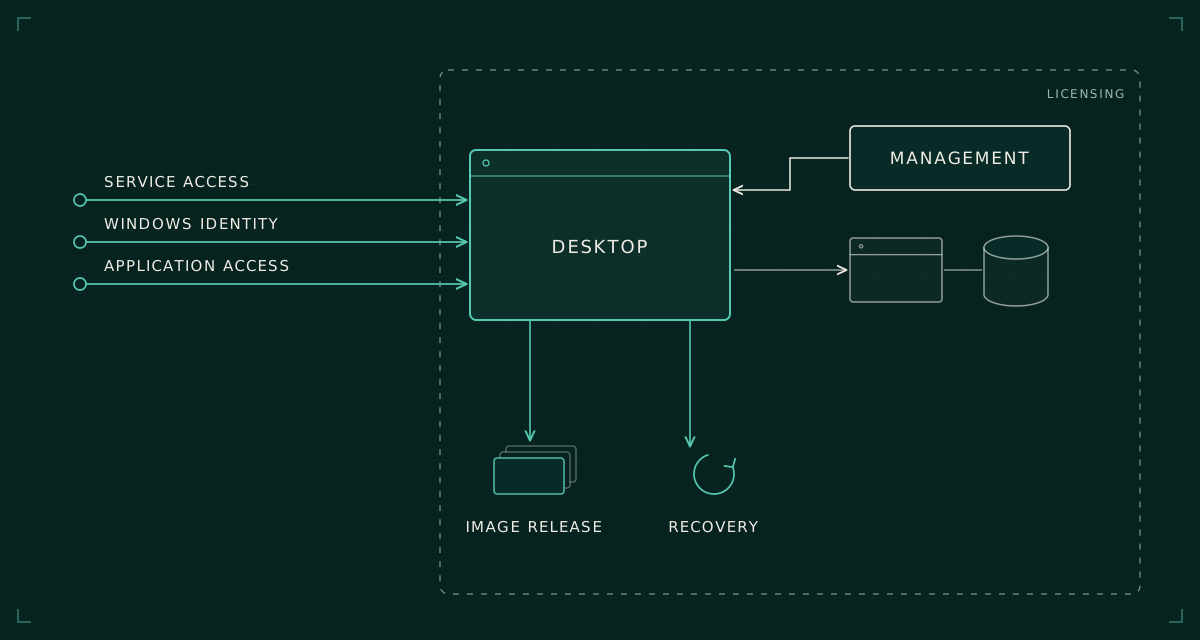
A Windows 11 desktop is one component of an EUC service. Its licensing, identity, applications, connectivity and support model have to work together.
The first successful Windows 11 sign-in is a useful engineering checkpoint. It demonstrates that a particular desktop, user and connection path worked at a particular moment. It leaves most of the enterprise design untested.
The larger question is whether that desktop is a dependable place to conduct business. Can it reach the application backend? Does its management policy arrive before the application needs it? What happens when the image is replaced, the user's identity changes or the connection drops during a transaction?
I would design AWS WorkSpaces around those questions before choosing a standard bundle. Otherwise the project can produce an attractive desktop that has no agreed operating model behind it.
Fix the service scope before the image
WorkSpaces Personal, pooled desktops and application streaming have different lifecycle and user-state assumptions. This discussion centres on Windows 11 WorkSpaces Personal. A design decision made for a persistent personal desktop should not be transferred casually to a pooled service.
Define the intended users and their work patterns. A knowledge worker using browser applications has different needs from a finance user with spreadsheet add-ins, a specialist with peripherals, or an engineer accessing large files over a private network. The choice should follow the workload and support requirements, rather than a general preference for persistent or non-persistent desktops.
Include location, client devices, working hours, accessibility requirements and data handling. Those details influence network paths, protocol testing, operating costs and what the support team must reproduce when investigating a fault.
Treat licensing as an architectural input
Windows 11 desktop licensing on AWS requires deliberate validation. AWS documents Windows desktop WorkSpaces through its Bring Your Own Licence requirements, including eligible Microsoft rights and dedicated infrastructure. A Windows Server-based desktop bundle is not interchangeable with a licensed Windows 11 desktop.
Confirm the actual agreement, service, region and intended deployment size with the accountable licensing owner. Record the conclusion and its source. Do not infer entitlement from a familiar Microsoft 365 product name or assume that a licensing position established for another hosting platform transfers unchanged.
Minimum deployment commitments and supported operating-system versions can change. They belong in the current design record, checked against the vendor documentation when the service is commissioned. They should not become unexplained constants copied from an old project spreadsheet.
Licensing can alter the economics of a small pilot and the shape of a regional deployment. It therefore needs attention before the image build becomes the critical path.
Draw three identity paths
A useful architecture separates access to the WorkSpaces service, sign-in to Windows and authentication to applications inside the desktop. A user may experience these as one journey, but they are different control points.
AWS supports a dedicated Entra ID directory for eligible BYOL WorkSpaces Personal, with IAM Identity Center supplying workforce identity and Windows Autopilot supporting Entra join and Intune enrolment. Its setup documentation specifies prerequisites and limitations, including protocol support. Those details need checking for the chosen configuration.
That supported route does not mean every existing Active Directory-dependent application becomes independent of Active Directory. Name resolution, integrated authentication, file permissions and application assumptions still need their own design. The alternative is an AD-integrated desktop architecture with its own directory, connectivity and management dependencies.
Choose one coherent route for each user group and document the transitions between identity systems. Test expired credentials, blocked users and lost devices as well as normal sign-in. An architecture diagram with one arrow labelled SSO is too coarse to explain a real access failure.
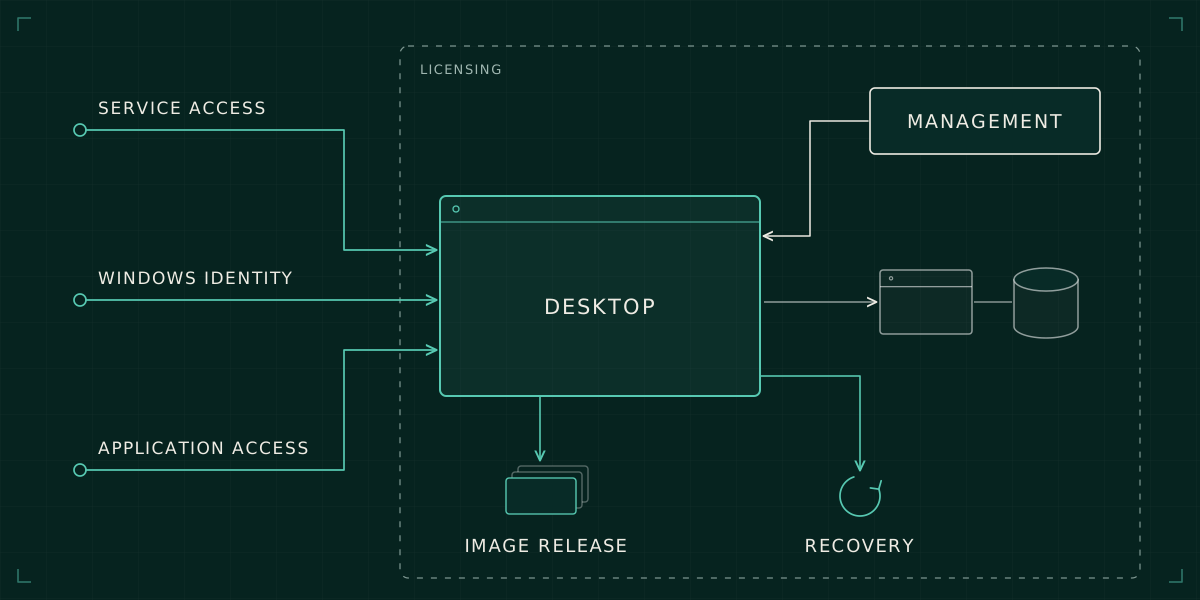
Build an image release process
An image is a release artefact. It should have a reproducible build source, a version, application ownership and a test record. Capturing a desktop after somebody has manually installed everything makes later troubleshooting unnecessarily dependent on recollection.
Keep the base image and user-specific configuration separate where practical. Record which settings are baked into the image, delivered by endpoint management, or applied when the user signs in. Overlapping responsibilities create ambiguous troubleshooting: the image says one thing while a later policy silently says another.
AWS's BYOL documentation includes constraints on image creation after Windows feature upgrades. Verify the supported build method for the intended release rather than assume that an upgraded desktop can always become the next image. The engineering consequence is to maintain a supported path to a clean base, with previous versions available for controlled recovery.
Test the resulting release through application journeys. Opening the application proves less than opening a representative document, saving it to the right location, printing through the expected route and recovering after a reconnect. Include security agents and management enrolment in the same acceptance run.
Follow the application traffic
Desktop placement and data placement need to be considered together. A desktop in AWS that repeatedly reads files or calls a database elsewhere may experience a workload very differently from a machine close to that backend. Nominal desktop specifications do not resolve that path.
Measure the actual journey from a representative client through the selected protocol and onward to each important dependency. Include constrained home connectivity and the corporate network path. Separate connection establishment, desktop responsiveness and application transaction time so that a slow experience can be located rather than blamed vaguely on the cloud.
Do the same for failures. A usable session during one network interruption does not prove that new users can connect during an identity or directory outage. Write separate expectations for existing sessions, new sessions and backend access.
Accept a service the support team can operate
A service acceptance record should answer four questions: how a desktop is provisioned, how it is maintained, how user data is protected and how a failed desktop is recovered. Rebuild, restore and replacement are different operations; test the one the runbook actually promises.
Before acceptance, connect each service obligation to a practical check:
| Obligation | Acceptance evidence |
|---|---|
| Identity | Intended user can connect; blocked user is denied |
| Application | Representative transaction completes over the target network path |
| Management | The released image enrols and receives the intended policy |
| Recovery | An authorised support engineer follows the tested recovery runbook |
Agree what support can do without escalation, where logs live and which team owns each identity or network dependency. A pilot should include a support engineer following the runbook, not only the engineer who built the environment.
The separate work of finishing a desktop migration still matters once users move. Here, the design goal is to reach that migration with a desktop service whose boundaries and behaviour are already understood. A modern operating system is useful. A service that can be supported, changed and recovered is what makes it an enterprise platform.