Cloud and EUC
Terraform state on Azure needs an operating boundary
Azure infrastructure permissions and Terraform state permissions need separate decisions. Test the backend identity, lock contention and recovery path before you rely on the deployment pipeline.
A Terraform deployment on Azure has two important targets. One is the infrastructure being changed. The other is the state that tells Terraform which objects it manages. A pipeline can be well scoped against the first and still have unnecessarily broad access to the second.
I've seen development and production state kept in the same container, with every pipeline able to read both.
I'd make the state boundary an explicit part of the platform design. Record who can read it, who can change it, how concurrent operations are controlled and what recovery would require. A storage account name in a backend block is only the beginning of that explanation.
Take a lab with separate development and production resource groups and no real workloads. The useful outcome is a short record of access and recovery tests, with observed results, that another engineer can repeat.
Treat state access as a separate permission decision
Microsoft's Azure Storage walkthrough explains why local state becomes difficult in a team and warns that state can contain sensitive information. Moving the file to Blob Storage changes its location; the access design still needs deliberate attention.
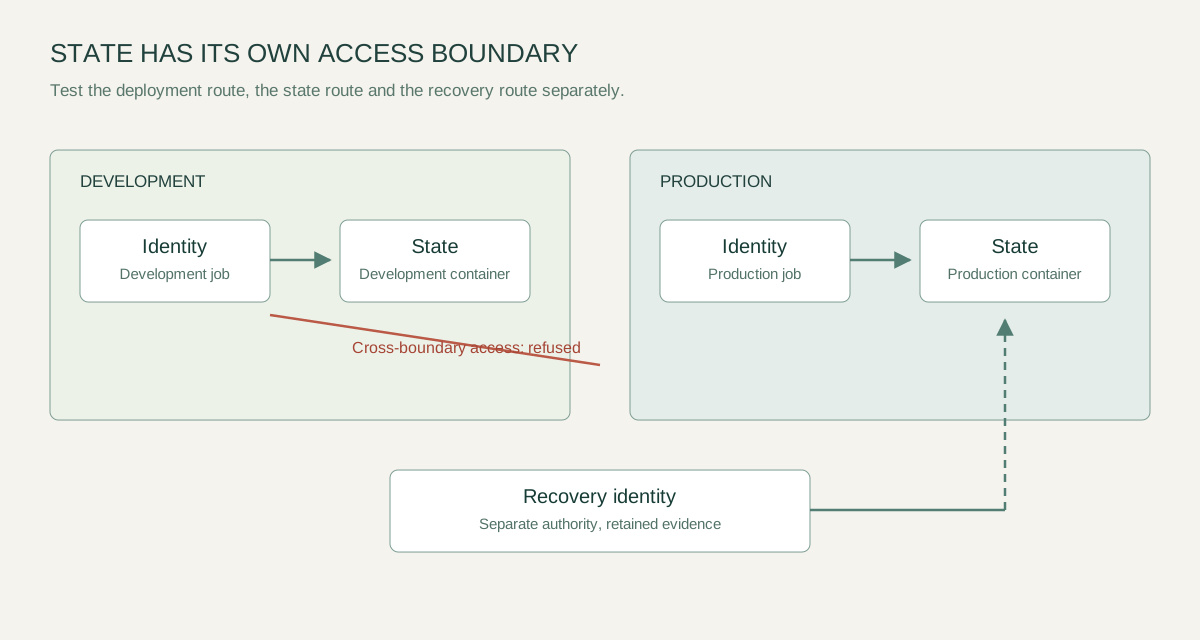
List the deployment identity, the backend identity and any human recovery identity separately, even when two currently happen to be the same principal. For each, state the operation it needs. Reading a state blob, updating that blob and changing the storage account are different responsibilities.
HashiCorp's azurerm backend documentation recommends Microsoft Entra ID authentication for the state blob, ideally with federated workload identity, which needs 'use_azuread_auth = true'. Microsoft's walkthrough uses a storage account access key in its example, a method HashiCorp doesn't recommend for new workloads.
The difference matters for scope. If the backend looks up the account key instead, the identity needs permission to read the storage account's keys, which is far wider than access to one container. Test backend authentication explicitly; a successful provider login doesn't prove the backend has the access you intended.
Keep credentials out of committed backend configuration and supply them through environment variables. HashiCorp warns that values passed with '-backend-config' or hardcoded in the configuration are written to the '.terraform' subdirectory and to plan files, so review both before placing them in an artefact store or attaching them to a support ticket. The confidentiality of the whole workflow matters, including the evidence retained after a deployment.
Choose a state boundary people can explain
A directory structure is a useful convention, but a name such as 'production' doesn't enforce a production boundary. The identity's effective permissions determine which state objects it can reach, and management roles count. Owner, Contributor and Storage Account Contributor include the 'listkeys' action, and Microsoft notes that the account keys give access to all data in the storage account, whatever the container role assignments say. Disallowing Shared Key authorisation on the state account ('AllowSharedKeyAccess' set to false) closes that route.
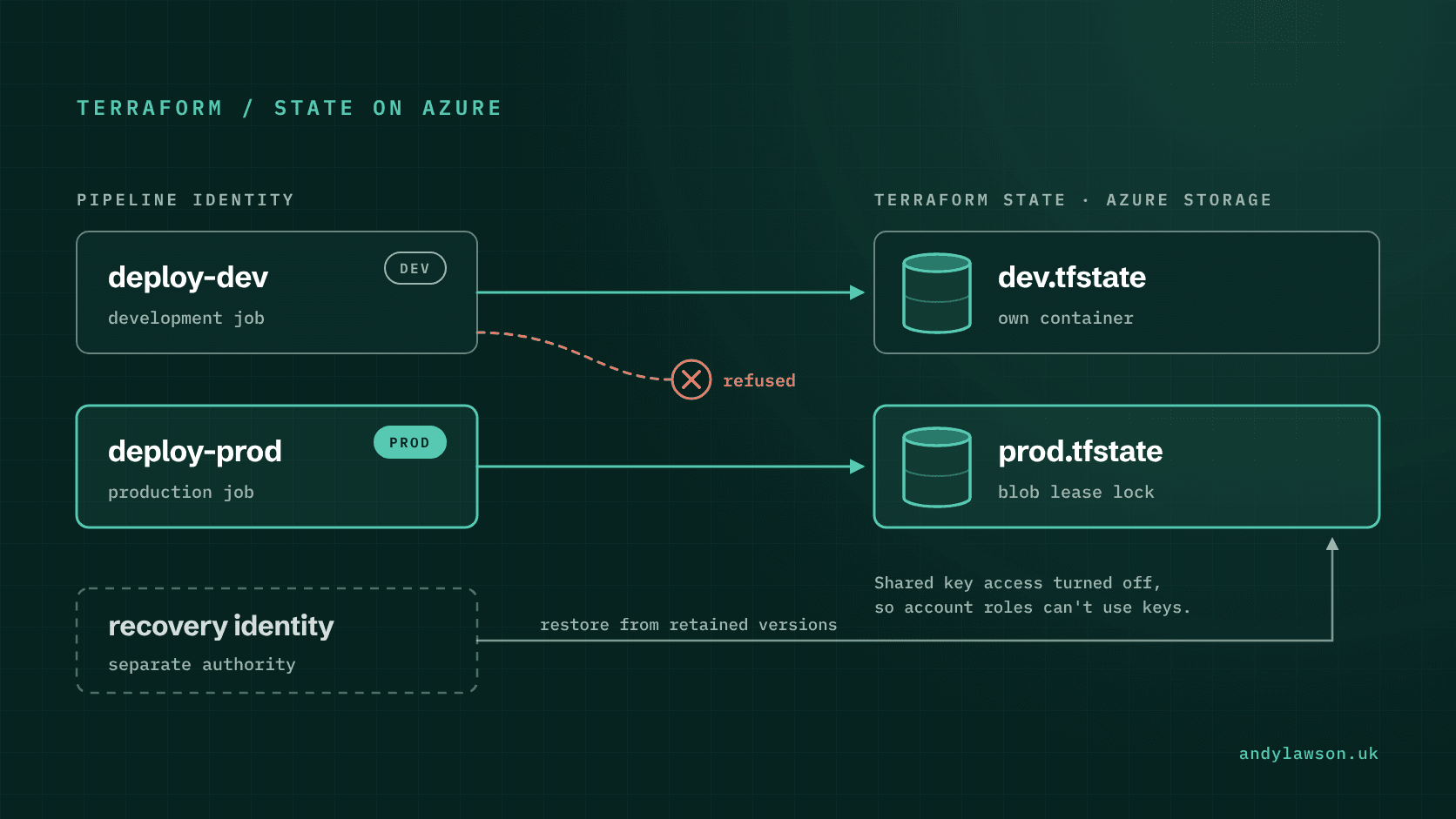
For the lab, start with a development container and a production container. Give the ordinary development identity Storage Blob Data Contributor on the development container only, which is HashiCorp's least-privilege recommendation. Then test whether it can read or update the production state through the actual backend path. Microsoft says role assignment changes can take up to 10 minutes to take effect, so allow for that before testing. Record the result; don't infer it from the role's display name.
Separate environments where they have different approval, ownership or recovery requirements. Avoid splitting state purely to make files smaller, because independently managed states can still share a dependency that has to change in a coordinated way.
Write down those dependencies. If the network is managed in one state and applications in another, identify the contract between them and who may change it. My earlier piece on state ownership covers the wider design question; Azure storage permissions are one concrete place to enforce the answer.
Understand what the lock protects
The Azure backend supports state locking, and Microsoft's walkthrough says the state blob is locked automatically before any operation that writes state. HashiCorp's locking guidance explains the purpose of preventing concurrent operations against the same state and warns about forcibly releasing another operation's lock.
That mechanism doesn't coordinate every change in the estate. Two states may both influence a shared service. A manual portal change can also happen while a deployment runs. The operating model still needs a defined owner for each resource and an understood route for exceptions.
Test contention in the lab with two controlled operations against the same state. By default, the second operation fails straight away because '-lock-timeout' defaults to 0s; set a timeout if you want it to wait. Record the error, the lock details Terraform reports and the operator's next step. Never practise forcibly releasing a lock against a real active deployment.
The runbook should first establish whether an operation is still running. An apparently old lock isn't enough evidence that its owner has stopped. On Azure, Terraform takes the lock as a blob lease with no expiry, so a runner that dies mid-apply leaves it in place. Anyone with write access can break a blob lease without knowing its ID, so breaking it in the portal or CLI is just as forceful as releasing the lock through Terraform and needs the same sign-off. Record who may authorise intervention and how they establish that the intervention is safe.
Design recovery before the first incident
Encryption at rest and a recoverable operating history answer different questions. Decide what state recovery requires, configure the matching storage protection and prove it with disposable resources. Blob versioning keeps a previous version on every write or delete, blob and container soft delete let you restore deleted items within a retention period, and a Resource Manager lock protects the account itself. Versioning can't recover a deleted container or account, and it isn't supported on accounts with a hierarchical namespace. Microsoft's data protection overview sets out the options.
For a controlled exercise, retain a known-good state version, make an ordinary change and examine what restoring an earlier version would imply. Keep the corresponding configuration revision and resource history beside it. Don't treat an old state file as permission to apply an old configuration blindly.
The important reconciliation is between the recovered record and the resources that actually exist. Pause ordinary writers while investigating a state problem, preserve the evidence and inspect the proposed changes before allowing another apply.
Include backend availability in the exercise. A private endpoint, firewall rule or runner change can prevent access without corrupting any state. The support process needs to distinguish an authentication or authorisation failure, a network failure and damaged or unexpected content.
Keep a small acceptance record
A useful acceptance record can fit on one page. State which identity was used, which container and blob were targeted, which configuration revision was tested and what happened.
| Check | Expected observation |
|---|---|
| Development operation against development state | The intended operation succeeds |
| Development identity against production state | Access is refused through the tested path |
| Concurrent operation against one state | Lock contention is visible and handled |
| Recovery exercise with disposable resources | The chosen record can be recovered and reconciled |
Keep the test scope precise. A refusal from one identity and path doesn't prove that every other credential or network route is equally constrained. Review inherited access, account keys and emergency routes as part of the same boundary.
The result should be an Azure deployment service whose owners can explain both forms of authority: the authority to change infrastructure and the authority to change its management record. Giving state its own owner, access tests and recovery procedure makes that explanation much easier to trust.